
Help
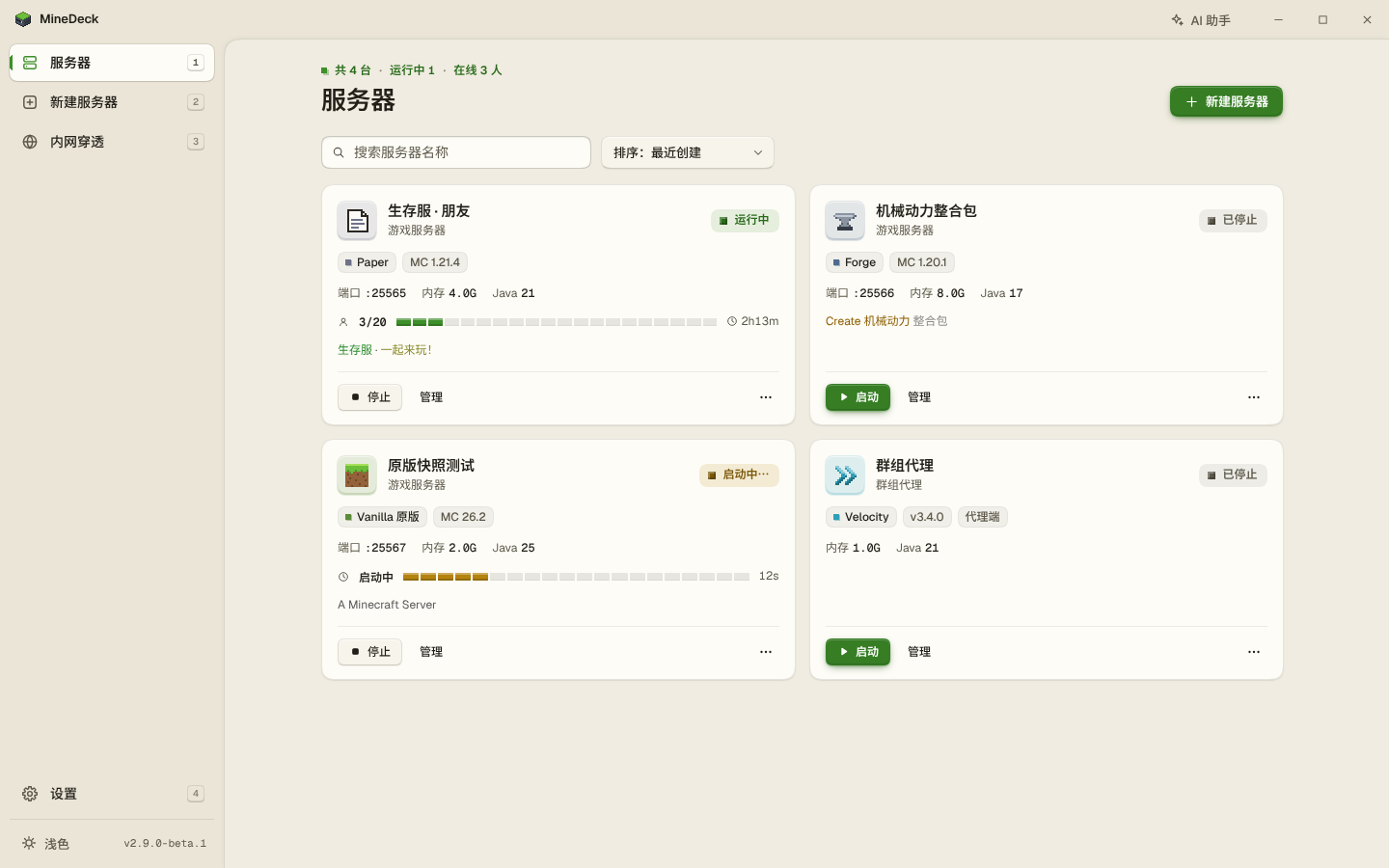
New to MineDeck? Start with the quick start. The MineDeck interface is in Chinese, so labels are given here with the Chinese text you will see on screen.
Quick start
- Open MineDeck and click New server (新建服务器).
- Pick a server type, a version and a build, accept the EULA, and press create.
- When creation finishes, press start. When the console prints
Done (...)!the server is up. - Friends on the same LAN connect to
this PC's LAN IP:port. For friends on other networks, you add a tunnel under Tunnels (内网穿透), bind it to this server, turn on start with the server (跟随实例启动), and send them the public address.
Common tasks
- Sending a command: open the server → Console (控制台) → the input box at the bottom.
- Changing settings: open the server → Common settings (常用设置) or All config (全部配置). Items that need a restart are marked.
- Changing memory: open the server → Memory / startup (内存 / 启动). On a beta you can also switch Java there.
- Starting a server by hand: each server's folder contains a
run.batthat does the same as the interface. - Running without a window:
MineDeck.exe -nogui. The default port is 27333,-portsets another, and a random port is used if it is taken. The address of the management page and its token are printed to the program's log output. The release build is a windowed program, so you will not see that line if you run it straight from a terminal; redirect standard error to a file. - A stdio bridge for AI tools on this PC:
MineDeck.exe -mcp. Turn on the MCP interface in Settings first, and MineDeck has to be running already.
FAQ
Do I need to install Java myself?
No. If a suitable Java is already on the PC, MineDeck uses it. If not, it downloads one that matches the game version, for its own use only, without changing system settings.
#My friends are not on my network. How do they join?
Add a tunnel under Tunnels (内网穿透), using OpenFrp, SakuraFrp or your own frps. Bind the tunnel to this server and turn on start with the server (跟随实例启动). After the server is up, send your friends the public address. Friends on the same LAN do not need a tunnel.
#Which versions and server types are supported?
Minecraft 1.12.2 up to the latest release, including 26.x, across 12 server types (see Features). Modrinth .mrpack and CurseForge zip modpacks can be imported.
#The server will not start and I cannot make sense of the error. What now?
Look at the error banner at the top of the console first. A missing dependency mod, a client-only mod on the server, a port in use, the wrong Java version: it recognises these common causes directly, with no AI. With AI configured you can click Let AI analyse (让 AI 分析), or ask the AI assistant.
#Will AI change my server on its own? Does it cost extra?
AI is optional, and nothing goes online unless you set it up. To use it you enter your own API key and the provider you chose bills you; MineDeck estimates what was spent, and each feature can have a daily limit. Reading logs and configs it does directly. Before it changes a config, switches Java or restarts a server, it shows a confirmation card and acts only after you confirm. In the game, only the players you tick can have it run commands, and only allowlisted ones; op and execute are never run.
#What do my friends need to install for AI companions and music sharing?
AI companions: friends install the companion mod on their client. It is on the Download page; pick the one that matches the server's loader and game version. Music sharing: the server and your friends all install the same version of Simple Voice Chat. The bridge mod is installed on the server by MineDeck; friends do not need it.
#Stable or beta?
Use the stable release for everyday hosting. Betas come out ahead of a release with features that are not in stable yet, and may still have problems. When there is a beta newer than the stable release, the download page lists it. Run a beta from its own folder and back up before trying it on an existing server. One beta does not update to the next; once the release is out, people running a beta can update to it in Settings.
#Windows says “Windows protected your PC”?
MineDeck.exe is not code-signed, so SmartScreen may block the first run. Click More info → Run anyway. You can verify the SHA-256 first as described on the Download page.
#Friends on my LAN cannot connect?
The first time a server starts, Windows Firewall may ask. Choose Allow access, otherwise friends on the LAN cannot connect.
#Data, moving and uninstalling
- By default everything is in the folder that holds the exe:
servers,backups,runtimes(downloaded Java and tunnel clients),cache,logsanddata, plus the filesconfig.json,secrets.jsonandtunnels.json. Only interface preferences are in%LocalAppData%\MineDeck. - To move, copy the whole folder. The secrets in
secrets.jsonandtunnels.jsonare encrypted for this Windows user on this PC, so they have to be entered again after moving to another PC or user. If the new location has a different path, servers that use MineDeck's own Java will report that Java cannot be found and need it set once more: on a beta, pick it under Memory / startup (内存 / 启动); the stable release has no such entry in the interface, but with AI configured you can ask the assistant to switch it. - Do not delete the
runtimesfolder. Servers that use the Java in it will not start without it. - Uninstalling: if start-with-Windows is on, turn it off first under Settings → Startup and tray (设置 → 启动与托盘). Then delete the folder that holds the exe, and
%LocalAppData%\MineDeck. If you moved servers or backups somewhere else, delete those folders separately.
Known limits
- The interface is in Chinese only, and the program is Windows only.
- Paper, Purpur and some other server types have no mirror in mainland China; the official addresses usually work. When installing Forge or NeoForge, some files still have to come from the official sources, and that step can fail if those cannot be reached.
- Backups contain the world only, not mods, plugins or configs.
- Stop all servers before updating MineDeck.
- On Windows 10, music sharing can only record the whole PC.